Outside of art I tend to spend around one weekend a month doing what I think of as a quality of life pass on my workspace. This includes stuff like re-organizing projects, tutorials, and clearing out my ever growing downloads folder. It also includes solving or working around issues that have slowed down my workflow. As I come across tips I'm happy to share whatever I find that helps my fellow art homies work better.
So let's talk about some cool fixes and tools for speeding up thumbnail browsing in Windows Explorer. And a little bit about the process of course!
[TL;DR, scroll down to Solutions for the fixes]
"FUCK!"
How does this work?
Usually it starts with foul language. If you're outside my window you can probably hear "FUCK" every few hours. When you hear that, you know I went to do something in 3DS Max or Windows only to be boned in the end. Might be something as small as lamenting the half-baked UV straighten tool in Max or... waiting a full minute for thumbnails to load in a frequently visited folder in Windows.
In the past, I had a pretty bad habit of stopping right then and there to track down how I could solve whatever the problem was because like, the internet is right there. But I kinda realized that that wasted time and threw my focus off in the middle of a session. So instead I switched over to one of my favorite pastimes: writing random things. It's how I begin all my projects. Usually I pop open a doc and start jotting down ideas. So this time, I started doing that in a sequence of files that came to be known as [fill in the blank]Annoyances.txt.
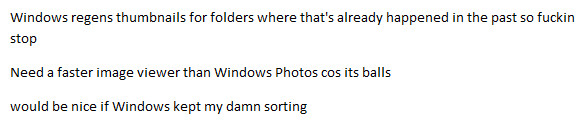
These docs are usually pretty short and consist of rows of very angry sentences:
Usually I go back and clean these up a bit, but also no
This helps me to prevent myself from being derailed during the creative process by googling to fix random non-blocking technical problems. As you can probably tell, last time I investigated a source of major slowdown for me: thumbnails in Windows Explorer.
Thumbnails, please
If you're an artist with a computer you have more images than is legal (in some country, probably). Likely you don't have hundreds, but like thousands in a bunch of weird file types, and you love thumbnails. More than that, you probably need thumbnails to be able to quickly tell the difference between T_thiccBrick_A.tga and T_thiccBrick_B.tga when you're working on a project.
 Gross
Gross
Solutions
So in my doc, I end up trying out a couple of solutions and making notes of what works. Here's what's been working for me to eliminate slowdown in thumbnail browsing.
A) Windows doesn't remember my folder sorting because I have too many folders apparently
B) Windows icon cache is automatically deleted for some reason, usually between computer power downs but also when it's most inconvenient I guess
C) BONUS! How can I generate thumbnails without visiting the folder?
D) BONUS! I want a faster image viewer
- solution: Irfanview wins for speed, hands down
Once I tried these, I noticed instant improvements in my windows explorer browsing experience. My downloads folder was no longer a mess of half loaded images. My project texture folders were no longer causing my expensive PC to somehow chug as I browsed them. And the best part is... it has stuck, even after restarts. There are some things I'm mentally preparing for because this is Windows. Like, I fully expect to have to redo some of this after some random Windows update. But for now, I'm enjoying browsing my images at top speed.
The sweetest part of this deal is the WinThumbsPreloader. This thing works recursively (that is, it can generate thumbs for folders inside of folders) and is crazy fast. Just right click on a folder and tell it to do it's thing. The longest thumbnail gen took about 2 minutes and that was for 15K images. 2-3K it can chew through in mere seconds. So great!
I've used Irfanview, but fell away from it for a while. I'm back because it's the fastest image viewer I can find and because I finally figured out options that work for my viewing experience. I tried out a few other programs, but none were anywhere near as fast.
Well, that's it. Hope these tips are helpful to you and if you have suggestions for speeding up Windows, I'm all ears.
Thanks for reading and see ya next week!